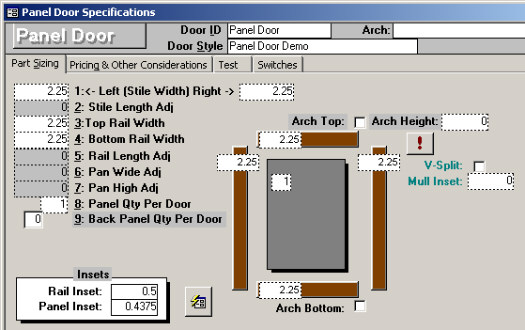
This is the basic stile and rail door that started this whole mess. The main measurements that need to be entered are the stile/rail widths, panel qty, and the Insets. Older versions of Doorlister® used the grayed out items, and have been replaced by the simpler Insets. Tip: An easy way to fill in the sizes is to go around the picture filling in the sizes.
The door shown below has both the Arch Top and the V-Split enabled.
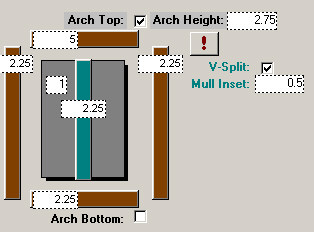
· Arch Top/Bottom: This allows you to put a measurement in the Arch Height, which is added to the panel either at the top/bottom for an arch. Any measurement in the arch height will be used for both the Top and/or Bottom arches. The Button with the "!", is an automatic way to calculate the Arch Height. In the above example, if we put 5" for the top rail width, and select the "!" button, it will put an Arch Height of 2.75" in there. Checking either the Arch Top or Bottom will add 2.75" to the panel top/bottom height to allow for the arch. Note: The calculate Arch Button (!) simply subtracts the width of the left stile from the rail width.
· V-Split: This allows for a vertical mullion to be placed in the middle of the panel door. Checking the box gives you Mullion Width and Inset fields for inputting measurements.